Posts

FY B.sc IT Practical 4(B): Design a web page with a form that uses all types of controls

Code: <!DOCTYPE html> <html> <head> <title>Password Input Control</title> </head> <body> <form > User ID : <input type="text" name="user_id" /> <br> Password: <input type="password" name="password" /> <br> Description : <br /> <textarea rows="5" cols="50" name="description"> Enter description here... </textarea> <br> <input type="checkbox" name="maths" value="on"> Maths <input type="checkbox" name="physics" value="on"> Physics <br> <input type="radio" name="subject" value="maths"> Maths <input type="radio" name="subject" value="physics"> Physics <br> <select name="dropdown"> <option value="Maths" selected>Maths</option> <option v...

FY B.sc IT Practical 3(C) :Design a web page with Imagemaps.

Image
 (a). Design a web page with Imagemaps. <!DOCTYPE html> <html> <body> <h1> Image Mapping</h1> <p>click on this Image</p> <img src="mobile.png"  alt="Mobile"  usemap="#phone" width="500"  height="500"> <map  name="phone"> <area  shape="rect"  coords="126,25,360,513"  alt="my phone"  href="home.html"> </map> </body> </html> output:

FY Bsc IT Practical 1(C) Design a web page demonstrating all Style sheet types

Main.html <!DOCTYPE html> <html> <head> <title>nested lists</title> <style type="text/css"> .fruits{color:blue} .vegetables{color:yellow} </style> <link rel="stylesheet" type="text/css" href="one.css"> </head> <body> <ul style="list-style-type:filled square"> <li class="bg" style="color:red">fruits</li> <ol style="list-style-type:upper-roman"> <li class="fruits">banana</li> <li class="fruits">apple</li> <li class="fruits">mango</li> </ol> </ul> <ol style="list-style-type:lower-alpha"> <li class="bg" style="color:red">vegetables</li> <ol class="grp1" start="4" style="list-style-type:uppper-roman"> <li class="vegetables">tomato</li> <li class=...

FY Bsc IT Practical 1(B). Design a web page using different text formatting tags.

One.html <!DOCTYPE html> <html> <haed> <title>One</title> </head> <body> <a href="two.html">Go to Two.html</a> </body> </html> Two.html <!DOCTYPE html> <hrtml> <head> <title>Two</title> </head> <body> Welcome to two.html. <br> <a href="three.html">Go to three.html</a> </body> </html> Three.html <!DOCTYPE html> <hrtml> <head> <title>Three</title> </head> <body> Welcome to Hyperlinks. </body> </html>

FY Bsc IT Practical 1 (A): Design a web page using different text formatting tags.

Image
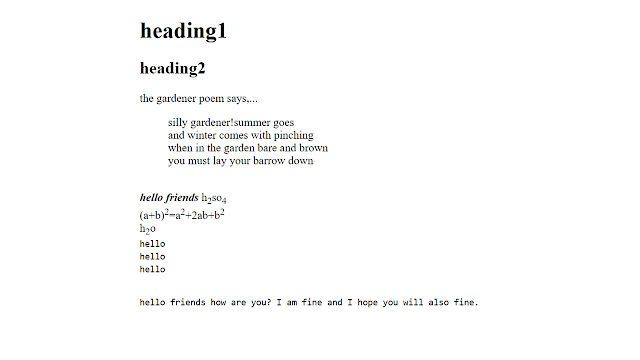
Code: <!DOCTYPE html> <html> <head> <title>different text formatting tags</title> </head> <body> <hgroup> <h1>heading1</h1> <h2>heading2</h2> </hgroup> <p>the gardener poem says,...</p> <blockquote> silly gardener!summer goes<br> and winter comes with pinching<br> when in the garden bare and brown<br> you must lay your barrow down<br> </blockquote><br> <b><i>hello friends</i></b> h<sub>2</sub>so<sub>4</sub><br> (a+b)<sup>2</sup>=a<sup>2</sup>+2ab+b<sup>2</sup><br> h<sub>2</sub>o<br> <kbd>hello</kbd><br> <code>hello</code><br> <samp>hello</samp><br><br> <pre>hello friends how are you? I am fine and I hope you will also fine.  </pre><br><br> </body> <...

Formatting TextView in Android.

Image
  Thank You!!! Enjoy the Coding....👍👍

Android Mock Test

    Quiz  
  CSS Properties CSS has so many predefined properties. CSS properties can be used to apply a style on the web page. Some of them are described as follow. Text Properties: we can use these properties on text data of web page Property Description Values color Sets the color of a text RGB, hex, keyword line-height Sets the distance between lines normal,  number, length, % letter-spacing Increase or decrease the space between characters normal,  length text-align Aligns the text in an element left, right, center, justify text-decoration Adds decoration to text none, underline, overline, line-through text-indent Indents the first line of text in an element length, % text-transform Controls the letters in an element none, capitalize, uppercase, lowercase Below example will explain , How to use these properties? e.g: p { color: yellow; text-decoration:underline; text-transform-capitalize; } List Properties Property Description Values list-style Sets all the properties for a lis...
Image
To start Quiz click on   Java Quiz 1  

Custom Buttons in Android

Image
Android applications make use of so many UI components, out of those some can be customized as per our need. In this tutorial, we will learn about custom Buttons in very few steps.  Two shapes we will see in this Tutorial. 1. Rounded Corner Button 2. Circle Shape Button. First of all, we will see how to create rounded corner Button Step 1: After creating Android Project create XML file under res => drawable folder and give a name   rounded_corner_bg.xml and paste below code. <?xml version="1.0" encoding="utf-8"?> <shape xmlns:android="http://schemas.android.com/apk/res/android"     android:shape="rectangle" android:padding="10dp">     <!-- you can use any color you want -->     <solid android:color="#00BCD4"/>     <corners android:radius="40dp"/> </shape> Step 2: Open activity_main.xml file and paste below code <?xml version="1.0" encoding="utf-8"?> ...