Posts

Showing posts with the label HTML

FY B.sc IT Practical 3(E) : Write a program in JavaScript to accept a sentence from the user and display the number of words in it. (Do not use split () function).

 <!DOCTYPE html> <html> <head> <title>Without using split function</title> <script> var str=prompt("Enter the sentence=",""); var count=0; for(i=0;i<str.length;i++) { if(str.charAt(i,1)==" " && str.charAt(i+1,1)!=" ") count++; } document.write("Number of words are="+(count+1)); </script> </head> <body> </body> </html>

FY B.sc IT Practical 3(D) : Write a JavaScript program to accept a number from the user and display the sum of its digits.

 <!DOCTYPE html> <html> <head> <title>sum of digits</title> <script> var n=parseInt(prompt("Enter the number"," ")); var p=0,y; while(n>0) { y=n%10; n=parseInt(n/10); p=p+y; } document.write("Sum of digits is: "+p); </script> </head> </html>

FY B.sc IT Practical 3(C) : Write a JavaScript program to display all the prime numbers between 1 and 100.

 <!DOCTYPE html> <html> <head> <title>prime number</title> <script> for(var i=1;i<=100;i++) { var flag=0; for(var j=2;j<=i/2;j++) { if(i%j==0) { flag=1; break; } } if(flag==0) { document.write(i+"<br>"); } } </script> </head> </html>

FY B.sc IT Practical 3(B) : Design a form and validate all the controls placed on the form using Java Script.

 <html> <head> <title>Form Validation</title>  <script type="text/javascript"> function validate()  { if( document.myForm.Name.value == "" )  {  alert( "Please provide your name!" );  document.myForm.Name.focus();  return false; } if( document.myForm.EMail.value == "" )  {  alert( "Please provide your Email!" );  document.myForm.EMail.focus();  return false;  }    if( document.myForm.Zip.value == "" ||isNaN(  document.myForm.Zip.value ) ||  document.myForm.Zip.value.length != 5 )  {  alert( "Please provide a zip in the format #####." );  document.myForm.Zip.focus();  return false;  } if( document.myForm.Country.value == "-1" )  {  alert( "Please provide your country!" );  return false;  }  return(true);  }  </script> </head> <body> <form name="myForm" onsubmit="return(validate());"> <table cel...

FY B.sc IT Practical 2(E): Design a web page embedding with multimedia features.

Note: Download  'Video' and 'Audio' files and keep it in the same folder where the program is been saved.   <!DOCTYPE html> <html> <head> <title>Multimedia</title> </head> <body> Video File: <video width="240" height="320" controls> <source src="myvideo.ogv" type="video/ogg"> <source src="myvideo.mp4" type="video/mp4"> <source src="myvideo.avi" type="video/avi"> <embed src="myvideo.mp4"> </video> <br> Audio File: <audio width="240" height="320" controls> <source src="myaudio.ogv"> <source src="myaudio.mp4"> <source src="myaudio.avi"> <embed src="myaudio.mp4"> </audio> </body> </html>

FY B.sc IT Practical 4(B): Design a web page with a form that uses all types of controls

Code: <!DOCTYPE html> <html> <head> <title>Password Input Control</title> </head> <body> <form > User ID : <input type="text" name="user_id" /> <br> Password: <input type="password" name="password" /> <br> Description : <br /> <textarea rows="5" cols="50" name="description"> Enter description here... </textarea> <br> <input type="checkbox" name="maths" value="on"> Maths <input type="checkbox" name="physics" value="on"> Physics <br> <input type="radio" name="subject" value="maths"> Maths <input type="radio" name="subject" value="physics"> Physics <br> <select name="dropdown"> <option value="Maths" selected>Maths</option> <option v...

FY B.sc IT Practical 3(C) :Design a web page with Imagemaps.

Image
 (a). Design a web page with Imagemaps. <!DOCTYPE html> <html> <body> <h1> Image Mapping</h1> <p>click on this Image</p> <img src="mobile.png"  alt="Mobile"  usemap="#phone" width="500"  height="500"> <map  name="phone"> <area  shape="rect"  coords="126,25,360,513"  alt="my phone"  href="home.html"> </map> </body> </html> output:

FY Bsc IT Practical 1(B). Design a web page using different text formatting tags.

One.html <!DOCTYPE html> <html> <haed> <title>One</title> </head> <body> <a href="two.html">Go to Two.html</a> </body> </html> Two.html <!DOCTYPE html> <hrtml> <head> <title>Two</title> </head> <body> Welcome to two.html. <br> <a href="three.html">Go to three.html</a> </body> </html> Three.html <!DOCTYPE html> <hrtml> <head> <title>Three</title> </head> <body> Welcome to Hyperlinks. </body> </html>

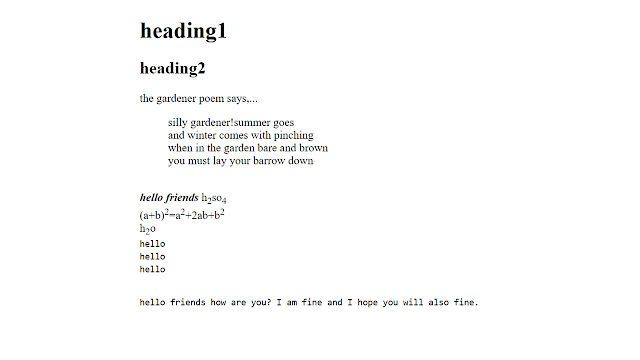
FY Bsc IT Practical 1 (A): Design a web page using different text formatting tags.

Image
Code: <!DOCTYPE html> <html> <head> <title>different text formatting tags</title> </head> <body> <hgroup> <h1>heading1</h1> <h2>heading2</h2> </hgroup> <p>the gardener poem says,...</p> <blockquote> silly gardener!summer goes<br> and winter comes with pinching<br> when in the garden bare and brown<br> you must lay your barrow down<br> </blockquote><br> <b><i>hello friends</i></b> h<sub>2</sub>so<sub>4</sub><br> (a+b)<sup>2</sup>=a<sup>2</sup>+2ab+b<sup>2</sup><br> h<sub>2</sub>o<br> <kbd>hello</kbd><br> <code>hello</code><br> <samp>hello</samp><br><br> <pre>hello friends how are you? I am fine and I hope you will also fine.  </pre><br><br> </body> <...
  CSS Properties CSS has so many predefined properties. CSS properties can be used to apply a style on the web page. Some of them are described as follow. Text Properties: we can use these properties on text data of web page Property Description Values color Sets the color of a text RGB, hex, keyword line-height Sets the distance between lines normal,  number, length, % letter-spacing Increase or decrease the space between characters normal,  length text-align Aligns the text in an element left, right, center, justify text-decoration Adds decoration to text none, underline, overline, line-through text-indent Indents the first line of text in an element length, % text-transform Controls the letters in an element none, capitalize, uppercase, lowercase Below example will explain , How to use these properties? e.g: p { color: yellow; text-decoration:underline; text-transform-capitalize; } List Properties Property Description Values list-style Sets all the properties for a lis...